How CUDA Streams and Events Took Our Multi-TRT Engine Pipeline from 8 to 84 Concurrent Sessions
Hey! This is my first blog post, so bear with me. I'm just dumping everything I learned while going from 8 to 84 concurrent sessions on an H100, and every wrong path I took to get there. I really wish someone had handed me this list of mistakes before I started.
The system is a real-time streaming speech-to-text pipeline: audio-preprocessing → encoder → state projection → autoregressive decoder, chained together as TensorRT engines. No off-the-shelf serving framework handles this kind of pipeline cleanly, so we built it from scratch.
This post is specifically about how CUDA streams and CUDA events made that 10x jump possible. I'll walk through every mistake along the way because that's where the real learning was. The single resource that finally made everything click was this NVIDIA presentation: CUDA Streams Best Practices.
Quick terminology note: "session" throughout this post means a concurrent client connection (like a gRPC stream). "CUDA stream" always means the GPU execution queue.
A Quick CUDA Streams Primer
Before diving into the story, let me explain what CUDA streams actually are, because the mental model matters a lot here.
Think of a CUDA stream as a to-do list for the GPU. You (the CPU) add tasks to the list. The GPU works through them in order, one after another. Now imagine you have two separate to-do lists. The GPU can work through both lists at the same time, picking up tasks from each independently.
That's it. A CUDA stream is just an ordered queue of GPU operations. Same stream = sequential. Different streams = can overlap.
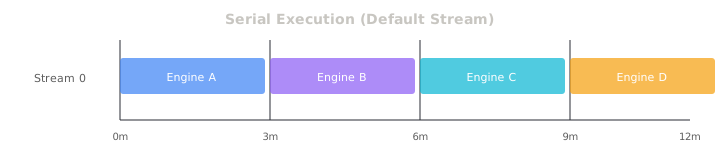
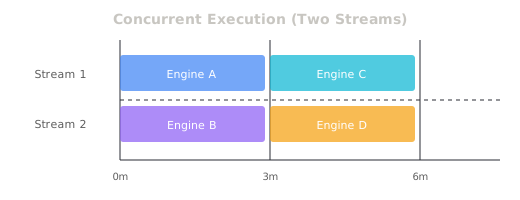
The key mental model: CPU as dispatcher
Here's something that tripped me up early on. When you "launch" a kernel or memory copy on the GPU, the CPU doesn't sit there waiting for it to finish. It just drops the work into the stream's queue and moves on immediately. The GPU handles it in the background.
The CPU stays ahead of the GPU, continuously feeding it work. The GPU has a queue to manage all of that, execute it, and hand results back. That queue is the CUDA stream.
The default stream is a silent killer
CUDA gives you a default stream (stream 0) for free. If you don't specify a stream when launching a kernel, it goes to stream 0.
The default stream is special. It synchronizes with every other stream. Any operation on stream 0 acts like a full barrier — it waits for all prior work on all other streams to finish, and nothing on any other stream can start until stream 0 is done too.
A single tensor operation on the default stream like a Python-side tensor[idx] slice can stall your entire multi-stream pipeline. We learned this one the hard way.
Why We Needed CUDA Streams
When I first implemented the inference pipeline, I honestly didn't know CUDA streams were a thing I needed to care about. So the baseline was dead simple: one GPU thread, default CUDA stream, torch.cuda.synchronize() at the end of each request.
Everything ran serially on the default stream. Results were horrible: 8 concurrent sessions on an H100.
To put that in perspective: in offline batch mode, this same pipeline was getting 330x real-time factor at batch size 84. Online, the theoretical ceiling with our memory budget is 84 sessions. We were at 8. That's roughly 10% utilization.
The whole pipeline was fully serialized. Decoder sat idle while Encoder ran. Encoder sat idle while Decoder ran. The GPU's capacity was just sitting there unused.
First Attempt: Too Many Streams, Too Many Locks
The obvious fix seemed straightforward: give each TRT engine its own CUDA stream, connect them with async queues, and let them run concurrently. We built a pipeline with 5 CUDA streams and 6 async queues.

Multiple engines sharing GPU memory means race conditions. So we wrapped shared memory accesses in Python threading locks.
What went wrong
Performance landed at 12–16 concurrent sessions. Barely 2x over baseline, despite 5x the complexity. Three things were killing us:
1. Python GIL killing CPU-side concurrency. Python's Global Interpreter Lock meant our threading locks weren't just protecting GPU memory access — they were serializing all the CPU orchestration too.
2. Accuracy bugs at high batch sizes. At batch size > 16, outputs started getting corrupted. The root cause: our Python locks only synchronized the CPU. The GPU doesn't care about Python locks. You can acquire a lock, queue a GPU write, release the lock, and the GPU is still writing long after you released it.
3. torch.cuda.synchronize() as a band-aid. To stop the corruption, we started adding synchronize calls everywhere. Each one blocks the CPU until all GPU streams finish. That's the opposite of concurrency.
The Default Stream Trap
Another bug hiding in the same period: tensor manipulation accidentally landing on the default stream.
After one engine produced output, we needed to slice those results and scatter them into per-slot buffers. PyTorch tensor operations like slicing and indexing execute on stream 0 (the default stream) unless you're explicitly inside a torch.cuda.stream() context manager.
What this looked like in practice: our 5-stream pipeline would periodically collapse into serial execution under load. Engine finishes on stream 2. Tensor slice happens on stream 0, forcing all streams to stop. Under sustained load this became a cascading stall that spiraled into timeouts.
The fix was simple once you know what's happening: make sure every GPU operation, including tensor slicing, happens inside a dedicated stream context. Nothing should ever touch stream 0.
The Simplification That Changed Everything
After wrestling with 5 streams and 6 queues, I took a step back and asked a basic question: what actually needs to run concurrently here?
Our pipeline has two natural halves. The first half (audio-preprocessing, encoder, state projection) runs once per incoming chunk and is relatively fast. The second half is the autoregressive decoder — iterative, loops step by step, and is the actual bottleneck.
The real gain comes from overlapping these two halves: while the decoder is working through chunk N, the encoder can be processing chunk N+1.
That's it. Two streams. Not five.
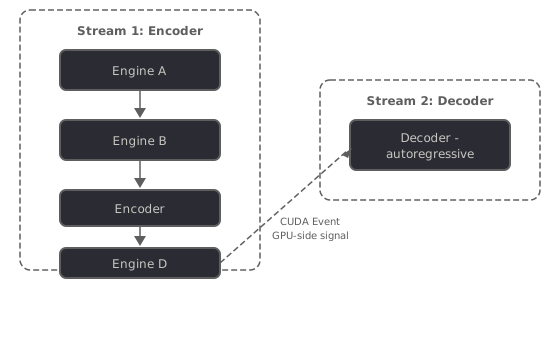
The before and after:
| Component | Before | After |
|---|---|---|
| CUDA Streams | 5 | 2 |
| Queues | 6 | 3 |
| Workers | 5–7 threads | 2 workers |
| Python locks (hot path) | Multiple | 0 (events only) |
More streams didn't give us more concurrency — it gave us more synchronization points, more race conditions to debug, and more GIL contention. Two streams with clean boundaries gave us less overhead and more actual GPU utilization.
CUDA Events: The Missing Piece
The two-stream structure was right, but we still needed a way for the encoder stream and decoder stream to coordinate without stepping on each other. This is where CUDA events came in and genuinely changed the game.
A CUDA event is a marker you can plant inside a stream. Think of it like a flag. When GPU execution reaches that point in the stream, the flag gets raised. Other streams can be told to wait for that flag before proceeding — and crucially, this all happens on the GPU side. The CPU doesn't have to block and watch.
cudaEventRecord(event, stream)— Enqueue the event into a stream. Event state is set to "occurred" when it reaches the front of the stream.
cudaStreamWaitEvent(stream, event)— Blocks stream until event occurs. Does not block the host!
That last line is the whole ballgame. cudaStreamWaitEvent is a GPU-side dependency, not a CPU-side one.
Here's how the two workers coordinate:
- Worker 1 (encoder stream) runs audio-preprocessing → encoder → state projection, then records a per-slot "ready" event on the encoder stream
- That event reference gets passed through a queue to Worker 2
- Worker 2 tells the decoder stream to wait on that event — GPU waits, CPU is free
- Once the encoder stream finishes and the event fires, the decoder stream copies the cross-attention cache and starts decoding
No Python locks. No synchronize() calls. No CPU stalls. The GPU handles all the coordination between streams itself.
Shared GPU State: The Cache Corruption Problem
Events solved the coordination problem between streams. But there was still one more thing that could corrupt everything.
The encoder writes state projection results into a shared GPU buffer. The decoder reads from that buffer repeatedly, for every autoregressive step of chunk N. But while the decoder is iterating on chunk N, the encoder might already be writing chunk N+1's data into the same buffer.
We tried three approaches to fix this (two terms: scatter = encoder writing output into per-slot buffers; gather = decoder reading per-slot buffers into a batch tensor):
Approach 1: Python Lock (BROKEN) — Acquire lock, queue GPU write, release lock. But the GPU is still writing after the lock is released. Other stream reads half-written garbage.
Approach 2: synchronize() (CORRECT but SLOW) — Queue write, synchronize, then read. Correct but blocks the CPU entirely.
Approach 3: Events + Snapshot (CORRECT and FAST) — Queue write on stream 1, record event, stream 2 waits on event, then gathers a snapshot (own copy, safe from overwrites).
The third approach works because of two things together:
- The event guarantees ordering: the gather on stream 2 cannot begin until the scatter on stream 1 has completed on the GPU — no CPU lock required
- The gather copies the relevant slices into a contiguous batch tensor on stream 2. This is an atomic snapshot. Even if the encoder starts writing chunk N+1 right after, the decoder has its own private copy
No CPU synchronization required anywhere in the hot path.
The Event-Driven Worker Loop
Last piece: how does the decoder worker know when a batch of GPU work is done?
The naive approach calls torch.cuda.synchronize() after each decode step. That blocks the CPU until the GPU finishes. Our solution uses event.query(), which is a non-blocking check:
- Pop items until each slot has a ready event from the encoder
stream.wait_event(slot_ready)— no host blocking, the GPU stream just queues a wait- Launch the decode batch, record a
batch_completeevent on the stream batch_complete.query()on the host side to check for finished results without stalling
The CPU stays busy collecting finished results, scheduling new batches, and handling session lifecycle while the GPU is crunching through decode steps. Neither is waiting on the other.
Lessons Learned
The CUDA Streams Best Practices presentation by Justin Luitjens at NVIDIA ended up being the most useful single resource. Here's what I'd tell myself at the start:
1. More streams can mean less concurrency. Our 5-stream architecture got 14 sessions. Our 2-stream architecture got 84. Every stream boundary is a synchronization point. Start with the minimum streams that make sense for your pipeline's natural parallelism.
2. Python locks don't protect GPU memory. A Python lock protects CPU-side code execution. GPU operations are just queued by the CPU and run later. Releasing a lock after queuing a GPU write means nothing — the GPU hasn't finished writing yet. For GPU memory ordering, use CUDA events.
3. Know the synchronization hierarchy. From heaviest to lightest:
cudaDeviceSynchronize()     ← blocks CPU, waits ALL streams
cudaStreamSynchronize(s)    ← blocks CPU, waits stream s
cudaEventSynchronize(e)     ← blocks CPU, waits event e
cudaStreamWaitEvent(s, e)   ← GPU waits, CPU is FREE
cudaEventQuery(e)           ← non-blocking check, CPU is FREE
If your hot path has anything from the top three, you're leaving performance on the table.
Appendix: CUDA Synchronization Quick Reference
| CUDA C | PyTorch | CPU Blocks? |
|---|---|---|
cudaDeviceSynchronize() | torch.cuda.synchronize() | Yes |
cudaStreamSynchronize(s) | stream.synchronize() | Yes |
cudaEventSynchronize(e) | event.synchronize() | Yes |
cudaStreamWaitEvent(s, e) | stream.wait_event(event) | No |
cudaEventQuery(e) | event.query() | No |
cudaEventRecord(e, s) | event.record(stream) | No |
Rule of thumb: if your hot path contains anything above cudaStreamWaitEvent, you're leaving performance on the table.
The system now handles the maximum concurrent sessions our GPU memory allows. Looking back, the thing that surprised me most: the system got faster every time we made it simpler. Five streams was worse than two. Six queues was worse than three. Every piece of complexity we added created a new failure mode.
The GPU doesn't reward cleverness — it rewards clarity.
CUDA streams and events were the tools. That was the lesson.